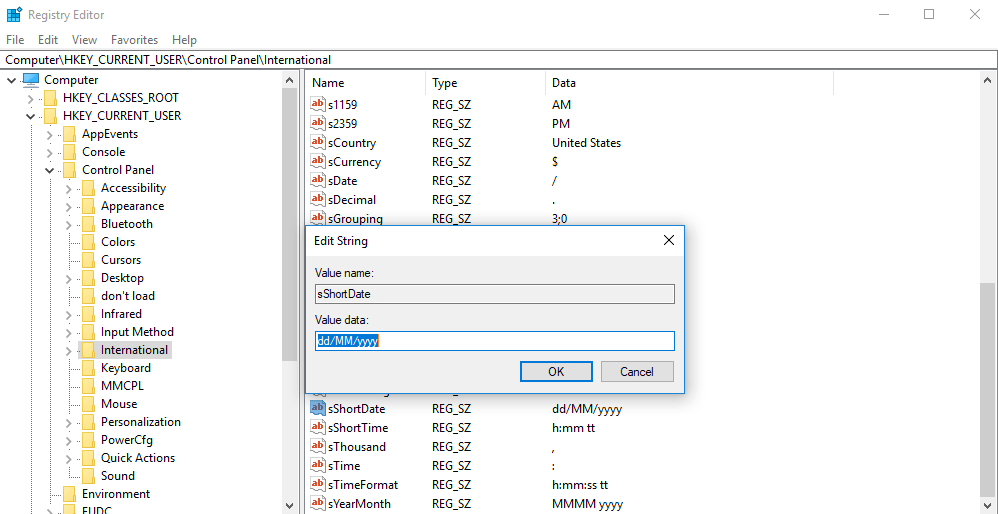
We develop web based software so most of time we have to face date time format problem. In our all of the project we prefer to use short date time format in US format (MM/dd/yyyy). But most of clients now a days while installing OS set the Indian English format so we have to face date time error in MS SQL Server and changing date time settings from Control Panel >> Regional Setting does not work as it change for the current user only not for all user as ASP.Net website runs on IIS with ASPNET user
Following are the steps to change the Short Date Format in Windows and Windows NT
Change the Short Date Format for All Users in the Registry
NOTE: This method does not work in Windows NT 4.0.
You can edit the regitry to change the short date format for all the user accounts on the computer:
- In Registry Editor, open the following key:
HKEY_USERS\.Default\Control Panel\International
- Add or edit the sShortDate string value using a value data for the short date format contained in the following list:
- MM/dd/yyyy
- M/d/yy
- M/d/yyyy
- MM/dd/yy
- yy/MM/dd
- yyyy-MM-dd
- dd-MMM-yy
- Quit Registry Editor.
- Log off Windows, and then log on to Windows again to save the setting.
 Sukh Vir Singh's Blog